SOFTWARE AROUND YOUR OPERATIONS
Warehouse barcode software in South Africa
Discuss this workflow with the Pika WMS team. Barcode warehouse software links a scanned item or location to a controlled stock transaction. We can scope scan-assisted receiving, putaway, picking and counts. Barcode formats, product identifiers, scanner behaviour and label readability are tested with your devices before the workflow is accepted.
Scoped milestones Clear ownership Support agreed upfront
Warehouse Barcode & Scanning SoftwareIllustrative
One connected view.The next step, visible.
- 01Scan an item and location
- 02Validate the requested movement
- 03Confirm the quantity and unit
- 04Record the result and any exception
A CLEAR STARTING POINT
Can barcode scanning help us check warehouse picks and stock movements?
Discuss this workflow with the Pika WMS team. Barcode warehouse software links a scanned item or location to a controlled stock transaction. We can scope scan-assisted receiving, putaway, picking and counts. Barcode formats, product identifiers, scanner behaviour and label readability are tested with your devices before the workflow is accepted.
Request a Pika WMS WalkthroughPIKA WMS · SOUTH AFRICA
Our warehouse software. Your operating requirements.
Pika WMS is ready, with 25+ clients across South Africa according to PCube. Request a walkthrough to see the current product and discuss your warehouse requirements.
The workflows below are requirements to review with our team. Confirm which functions are included now, which need configuration, and which need additional development, along with deployment, licensing and support terms.
THE BUSINESS PROBLEM
When the current approach gets in the way.
Warehouse teams replacing manual item entry with a defined scan and confirmation process.
A scan enters text without checking the intended stock transaction.
Cartons and single units are confused during receipt or picking.
Repeated scans can accidentally duplicate movements.
A BETTER WAY TO WORK
What this helps you improve.
- Make each stock movement traceable to a user, time and reference.
- Give staff a shared view of the next warehouse action.
- Review exceptions before they become an unexplained stock adjustment.
We agree the practical outcomes with you before development begins, then review the work against that scope.
Tell us what needs to improveREVIEW IN YOUR PRODUCT WALKTHROUGH
Check Pika WMS against your warehouse workflow.
Scope barcode receiving, bin transfers, picking verification and stock counts for South African warehouses, with device and label testing before rollout.
Review with Pika WMS: quantity and unit-of-measure validation
Review with Pika WMS: wrong-bin and wrong-item rejection rules
Review with Pika WMS: duplicate scan and retry handling
Review with Pika WMS: count reconciliation with approval
Review with Pika WMS: label and handheld-device proof of concept
These are capabilities we can scope for your project. Your quotation confirms the exact features, responsibilities and deliverables included.
HOW IT CONNECTS
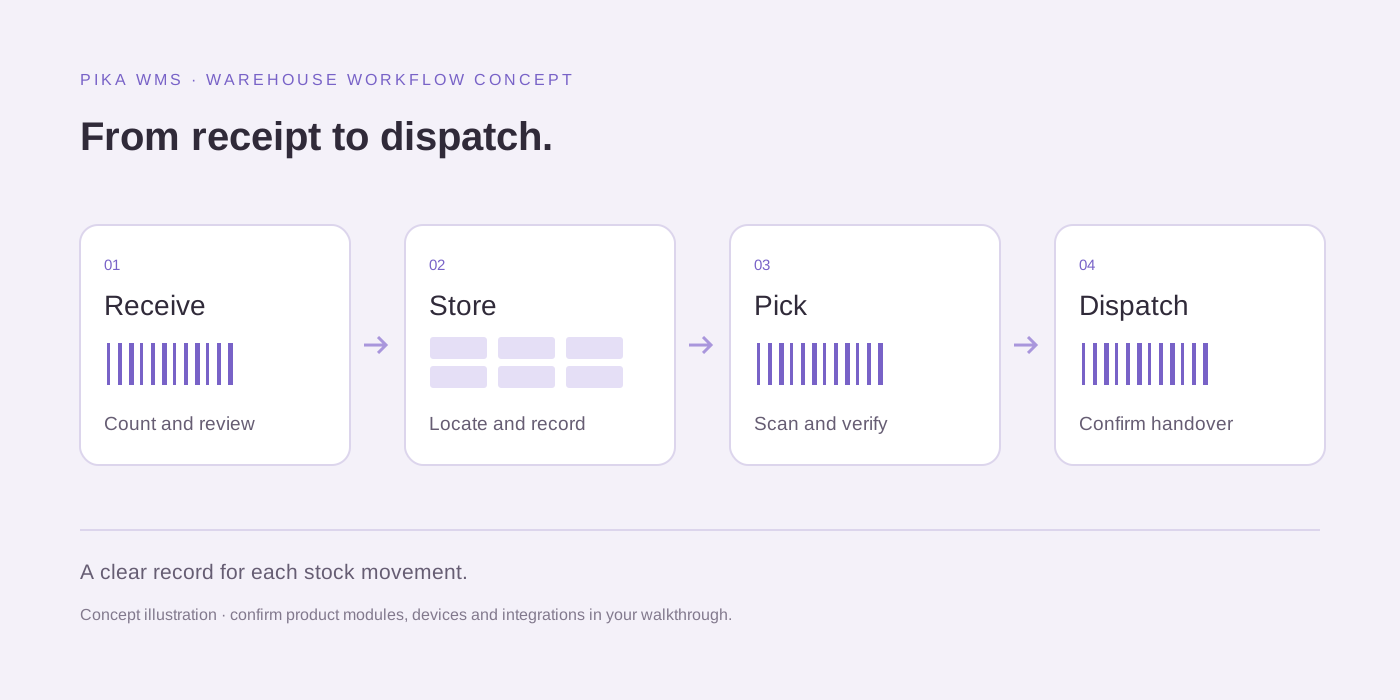
See how the work moves through your system.
A starting point for discussion. We adapt the sequence to your people, systems and operating rules.
01Scan an item and location02Validate the requested movement03Confirm the quantity and unit04Record the result and any exception
YOUR EXISTING TOOLS
Keep the systems that already work for you.
We review account access, supported interfaces and provider terms before confirming an integration. The right connection depends on your exact platform and workflow.
Existing ERP or accounting interfaces, subject to access reviewSupported online-store order APIsCompatible barcode scanners and label printersApproved carrier or client interfaces where scoped
Listed platforms are possible integration options, subject to feasibility. No partnership or universal compatibility is implied.
Explore API integrationFROM CONVERSATION TO DELIVERY
A process you can follow.
Requirements, milestones and payment terms are agreed in your quotation. You see the work at defined review points.
- 01
Review the current Pika WMS product with the warehouse team.
- 02
Confirm required modules, users, warehouse sites and product fit.
- 03
Check current feature availability and any configuration or development gap.
- 04
Validate devices, data migration and supported integrations.
- 05
Agree a pilot, acceptance criteria, onboarding and rollout.
- 06
Confirm licensing, data export, support and commercial terms.
PRICING WITH CONTEXT
Start with the release that matters most.
Request current Pika WMS pricing for your warehouses, users, required functions and support needs. Confirm licensing, setup, data migration, devices, integrations, training and recurring costs in writing. No public price or self-service trial is listed here.
Tell us how you work today, what you need to change and which tools you use. We will help identify a sensible starting point.
CONFIDENCE IN THE DETAILS
Know what happens after delivery.
Clear agreements and an organised handover are part of how we work. We establish responsibilities before the project starts.
Ownership in writing.
The Pika WMS agreement should define product licensing, your business data, exports, configured workflows, any commissioned extensions and the handover. A software subscription does not automatically transfer ownership of the underlying product.
A defined support plan.
Agree support hours, incident priorities, recovery procedures and included maintenance before launch. Remote support is available by agreement; round-the-clock cover and on-site attendance require an explicit arrangement.
Practical communication.
We work remotely with businesses across South Africa. Communication is available through whatsapp, email and scheduled calls, with project updates and review points agreed at the start.
BUSINESS CONTEXT MATTERS
See this in your industry.
Explore the workflows, questions and operational needs relevant to businesses like yours.
BEFORE YOU CHOOSE
Practical guides and reusable resources.
How to choose the best warehouse management system in South AfricaWarehouse management system costs in South Africa: what to include in a quoteWMS vs inventory management software: which does your warehouse need?Barcode stock control for South African warehouses: a practical rollout guideWMS implementation checklist: prepare your South African warehouse for rollout
YOUR BUSINESS. YOUR SERVICE AREA.
Remote delivery across South Africa.
We agree discovery calls, review milestones and handover around your team. Explore relevant service areas and how a project can fit your business.
CONNECTED SERVICES
Build on warehouse barcode & scanning software.
Explore the services that can support the next stage of your project.
Software
Pika WMS — Warehouse Management Software South Africa
Pika WMS warehouse management software for South African businesses. Scope receiving, bin locations, barcode picking, stock counts and dispatch with your team.
Explore this serviceSoftware
Warehouse Management Software Johannesburg
Pika WMS warehouse software for Johannesburg teams. Plan gauteng distribution and branch replenishment, barcode checks, stock visibility and supported integrations.
Explore this serviceSoftware
Warehouse Management Software Kempton Park
Pika WMS warehouse software for Kempton Park teams. Plan east rand receiving, staging and dispatch, barcode checks, stock visibility and supported integrations.
Explore this serviceSoftware
Warehouse Management Software Cape Town
Pika WMS warehouse software for Cape Town teams. Plan western cape replenishment and fulfilment, barcode checks, stock visibility and supported integrations.
Explore this serviceSoftware
3PL Warehouse Management Software
Pika WMS 3PL warehouse workflow review for South Africa: stock ownership, client access, receiving, fulfilment events and auditable billing inputs.
Explore this service
Software
Inventory Management Software
Track stock movements, locations and reorder needs with a system shaped around how your team handles inventory.
Explore this serviceSoftware
Logistics Software Development
Connect shipment intake, dispatch, delivery updates and customer visibility in one operational workflow.
Explore this service
Automation
API Integration
Connect existing business systems so records and updates can move between them with clear rules.
Explore this serviceBEFORE YOU START
Questions about warehouse barcode & scanning software.
Useful answers about scope, cost, ownership and ongoing support.
Can barcode scanning help us check warehouse picks and stock movements?
Barcode warehouse software links a scanned item or location to a controlled stock transaction. We can scope scan-assisted receiving, putaway, picking and counts. Barcode formats, product identifiers, scanner behaviour and label readability are tested with your devices before the workflow is accepted.
Which warehouse management system is best for our business?
The best fit is the system that passes your receiving, picking, stock-count and integration scenarios at a sustainable total cost. Evaluate Pika WMS and other shortlisted products using the same sample orders, devices and acceptance criteria. PCube does not claim an independently verified best-in-market rating.
Can the WMS connect to our accounting, ERP or online store?
We assess the exact product, version, API permissions and data ownership first. Agree which system owns items, orders and stock quantities, then test retries, duplicate messages and reconciliation. Sage, SAP, Shopify or WooCommerce connectivity is only included when its supported interface has been confirmed.
Will scanners work during an internet outage?
Offline support is a separate architectural requirement. We assess warehouse connectivity and define whether a task stops safely or queues locally. An offline design needs conflict, duplicate-submission and reconnection tests; it is not assumed in a standard browser workflow.
What should we budget for warehouse management software?
Request current Pika WMS pricing for your warehouses, users, required functions and support needs. Confirm licensing, setup, data migration, devices, integrations, training and recurring costs in writing. No public price or self-service trial is listed here.
What do we own after the project?
The Pika WMS agreement should define product licensing, your business data, exports, configured workflows, any commissioned extensions and the handover. A software subscription does not automatically transfer ownership of the underlying product.
What support is available after launch?
Agree support hours, incident priorities, recovery procedures and included maintenance before launch. Remote support is available by agreement; round-the-clock cover and on-site attendance require an explicit arrangement.
Does Pika WMS have customers in South Africa?
PCube reports that Pika WMS is ready and serves 25+ clients across South Africa. Ask the team about relevant client references and which examples can be shared during your enquiry.
Where can I try Pika WMS online?
There is no public Pika WMS product URL listed at present. Contact PCube to request a walkthrough and confirm demo availability, deployment options, current modules and commercial terms. Do not submit live warehouse credentials or customer data through the enquiry form.
What is a warehouse management system?
A warehouse management system helps coordinate stock and warehouse work, from receipt and storage to picking, counting and dispatch. The functions included vary by product and configuration, so ask for a demonstration against your own workflow.
Is Pika WMS cloud-based or installed on our own systems?
Confirm the deployment options directly with the Pika WMS team. Hosting, access, backup, recovery and data export responsibilities should be recorded in the proposal; this page does not promise a particular deployment model.
Can a small warehouse use Pika WMS?
Request a fit review with your stock volume, users, sites and required workflows. Compare the product and onboarding cost with a simpler inventory system before deciding; suitability depends on the operation, not only the size of the business.
LET’S BUILD SOMETHING BETTER
Tell us how your business works today.
You do not need a technical brief. Share your goals for warehouse barcode & scanning software and we will help define the next useful step.
No technical brief required. Just a conversation.